
Customer Password and Activation Password in SOLO Server
Background
The SoftwareKey System can use a License ID and Password to activate software, similar to a serial key used by other systems. A password is also used to log into SOLO Server's integrated eCommerce and Customer License Portal services. There are two passwords utilized by SOLO Server:
- Customer Password: Used to log into the SOLO Server shopping cart and Customer License Portal. For backwards compatibility, it can also be used to activate software.
- Activation Password: Starting with SOLO Server version 1.15.2.1, each License ID is automatically assigned a random Activation Password which is used to activate software. No user-identifiable information can be obtained with this password.
Should I have customers use the Customer Password or the Activation Password?
Depending on how you are using SOLO Server, your customers may need to use either or both.
- For activating software, we recommend using the Activation Password. By default, this is the information that is displayed on the SOLO Server shopping cart transaction receipts (if being used).
- Customers needing to access the Customer License Portal or use the integrated SOLO Server shopping cart will need to use the Customer Password.
Customer Password Visibility
Changes to the visibility of the Customer Password in the author interface have been introduced in SOLO Server version 1.15.2.4. A new Password Source field has been added to each Customer record, which identifies how the Customer Password was created or last modified:
- By the system (random)
- By an Administrator (random or user entered)
- By a customer (random or user entered)
Activation Passwords are always randomly generated by SOLO Server and can't be specified by the customer or administrator. Since Customer Passwords can potentially access user-identifiable information, additional security is now enforced. Customer Passwords randomly generated by SOLO Server or specified by an administrator will remain visible for backwards compatibility. Once a customer has chosen their own Customer Password through the SOLO Server shopping cart or Customer License Portal, it will no longer be visible to SOLO Server administrators and instead will be listed as "SECURE" in both the SOLO Server author interface and reports.
Why was this change made?
We value security. We are doing this to protect ourselves, you, and your customers from any liability caused by a security breach. Best practices recommend using a random and unique password for each online account/service, but it is known that customers often use the same passwords on all sites. Any theft of passwords could result in harm to your customers and ultimately you and us. We are taking these steps to mitigate as many security risks as possible.
What if the customer forgets their Customer Password?
If the customer doesn't remember their password, they will have the option to reset their password on the Shopping Cart account login page and in the Customer License Portal login page. They will need have a valid email address registered to that account. For Instant SOLO Server Shared URL accounts, the link to the Forgot Password page is:
https://secure.softwarekey.com/solo/customers/ForgotPassword.aspx?AuthorID=[your_AuthorID_here]
The customer can search by various fields, but the reset email will only be sent to email address that is registered for that record. If their email address is no longer valid, they will need to contact you to update the email address.
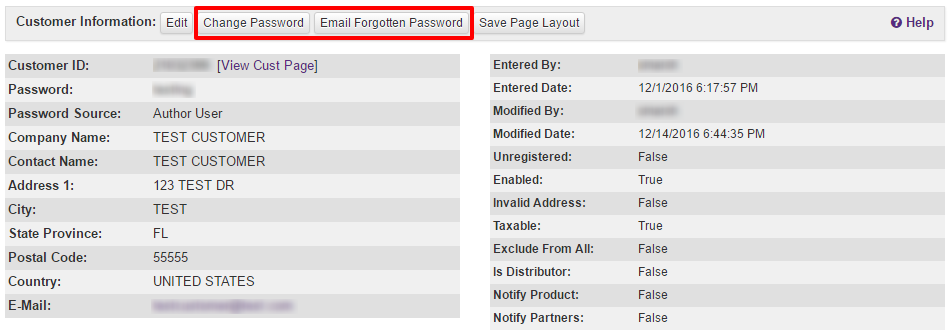
As a SOLO Server administrator, you have two options to help your customer. You can quickly trigger the customer Forgot Password email from the Customer Information page in the SOLO Server administration interface. You can also click the Change Password button, which will give you the option to specify or randomly generate a new password, as well as the option to notify the customer of their new password by email. Note that when you choose to change the password, you will then be able to see the customer password on the Customer Information page until the user changes it again. Both buttons are highlighted below:
Web Services and Reports
If you use the SOLO Server web service interfaces, the search will only look for customer records that have Customer Passwords not entered by the customer. Any exports that contain the password column will list the Customer Password as long as the user has not entered it, otherwise the value of "SECURED" will be returned.